Give your draft a voice.
Open a manuscript or document and let RedPen read it aloud. Listen for rhythm, repetition and the places your attention drifts.
FOR THE NEXT DRAFT
Catch the lines you skim past.
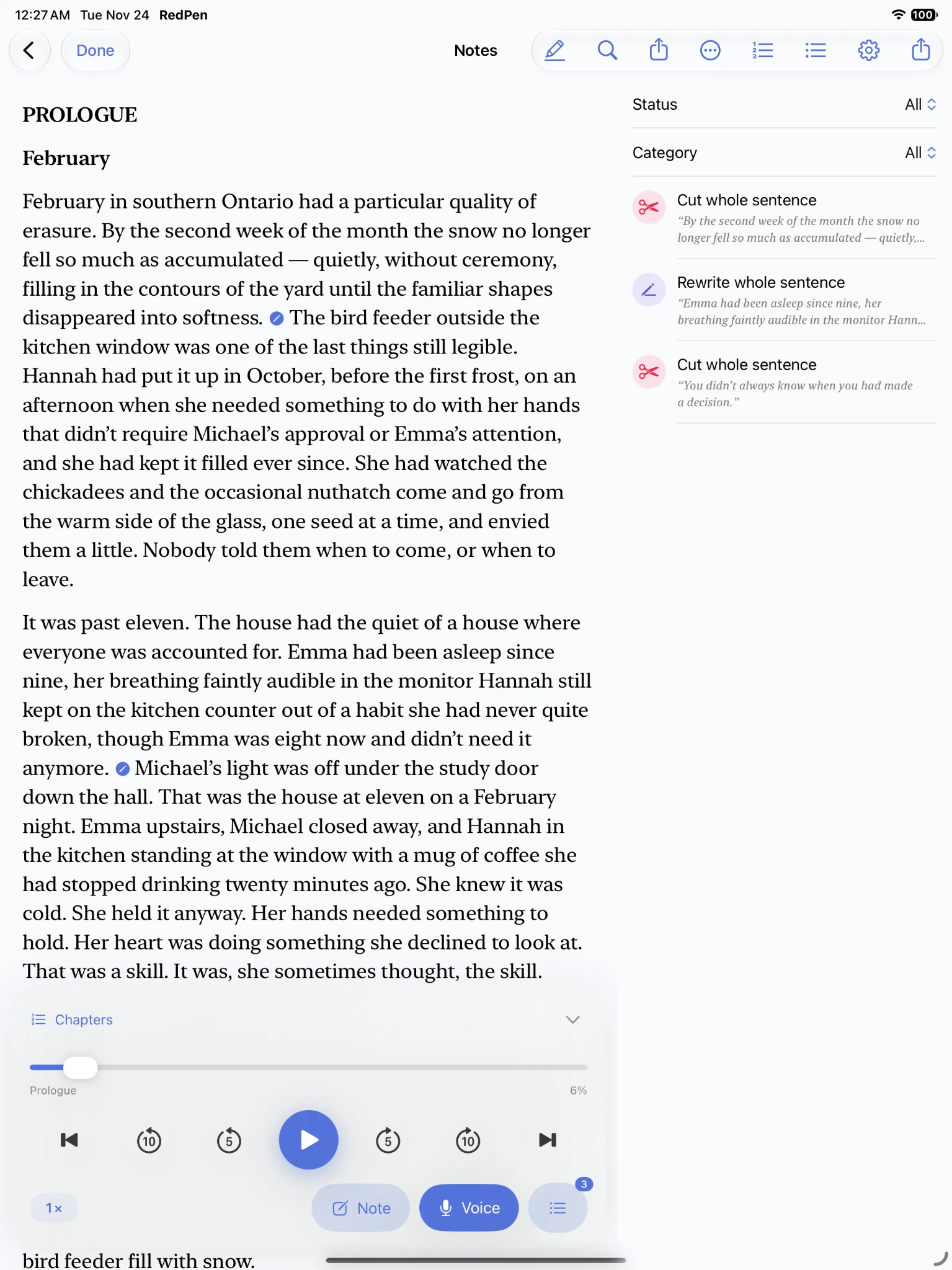
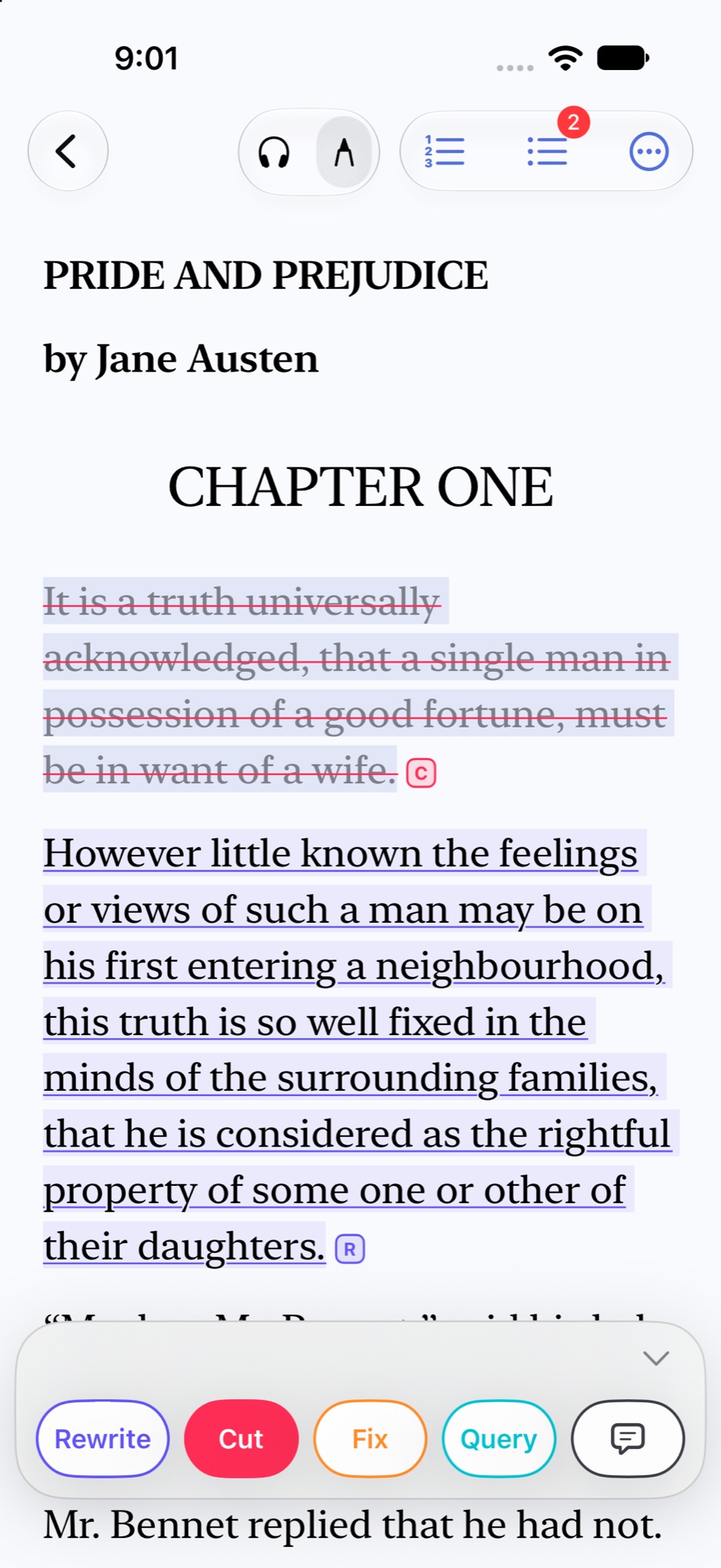
RedPen reads your draft aloud and highlights each sentence. Pause to flag a cut, capture a rewrite, or leave a typed or dictated note. Take your edits into Word or PDF.
A FRESH PAIR OF EARS
After a few passes, you start remembering your draft instead of reading it. Listening gives those familiar words a little distance.
Try this short example. Listen for the repeated word, then mark the sentence for revision.
The rain had stopped, but she could still hear it falling from the trees.
She folded the letter and set it on the the table.
For a moment, the room felt very still.
Then someone knocked at the door.
Uses your browser's available voice, not a RedPen AI voice. Marks stay in this example until you close the page.
Listen once before you look at the sentence. Then watch how to flag the edit in RedPen.
“Mara walked down the, the hall.” Hear that second “the”? It’s easy to skim past. RedPen reads your draft aloud and highlights each sentence as you go. Switch to Mark Up to flag the fix right on the page. Try RedPen on iPhone or iPad.
LISTEN. NOTICE. REFINE.
Everything you need to review a draft, right where you're listening.
Open a manuscript or document and let RedPen read it aloud. Listen for rhythm, repetition and the places your attention drifts.
Pause, rewind or jump ahead with easy playback controls. Replay the passage you want to hear more closely.
Type or dictate a note, then tag it as a rewrite, cut, fix or query. Keep your feedback beside the sentence it belongs to, ready for the next revision.
A CLOSER LOOK
From a passing thought to a focused editing session, keep the controls close and your words in view.
YOUR DRAFT. YOUR WAY.
Start with the voices on your device, or choose an AI voice for a different reading of your words.
Use the voices built into your iPhone or iPad. With built-in narration, your manuscript text stays on your device.
Choose a Standard or Premium Google/Gemini voice with word credits, or connect your own OpenAI, Amazon Polly or Microsoft voice keys.
Online narration sends the passages being read to the selected service. Own-key providers bill you directly.
Your manuscripts and notes are stored on your device. Back up or share them when you choose. Read the privacy policy.
Listen to the rhythm of your draft and flag the lines you want to revisit.
Keep observations connected to the words that prompted them.
Give reports, scripts and study notes a different kind of review.
A FEW GOOD QUESTIONS
Writers, editors and anyone who wants to listen more carefully to a draft. Use it to review the sound and flow of your words, then save notes for your next editing pass.
RedPen is available for iPhone and iPad. Download it on the App Store.
You can import manuscripts, use built-in voices, add notes and export without signing in. Paid AI narration uses Sign in with Apple to connect your purchases, word credits and saved audio to your account.
No. Start with your device's built-in voices. Paid Google/Gemini narration is optional and uses word credits. If you choose to use your own provider keys, that provider bills you directly.
Yes. Use Export backup on the library screen to save a copy, or use the share options to send files where you choose.

REDPEN
Available for iPhone and iPad.
Download on the App Store